LinkedIn Assistant
Automazione per trovare conversazioni rilevanti su LinkedIn, valutarle e ricevere bozze di commento già pronte da rivedere.
Il problema: essere presenti su LinkedIn richiede tempo e metodo
Costruire una presenza professionale su LinkedIn non significa solo pubblicare contenuti. Significa trovare conversazioni rilevanti, capire dove ha senso intervenire, leggere il contesto e contribuire con commenti utili. Questa attività richiede tempo, continuità e attenzione: senza metodo, si rischia di alternare attività intensa a lunghi silenzi, oppure di interagire con contenuti poco rilevanti.
- Troppe conversazioni da monitorare ogni giorno su fonti diverse
- Difficile capire quali post siano davvero rilevanti per il proprio profilo
- Continuità difficile da mantenere senza un sistema dedicato
- Commenti generici o fuori contesto danneggiano il posizionamento
- Serve coerenza tra tono personale, obiettivi e contenuto del commento
- Automazione non supervisionata rischia di diventare spam reputazionale
La soluzione: un assistente AI per trovare e preparare opportunità di engagement
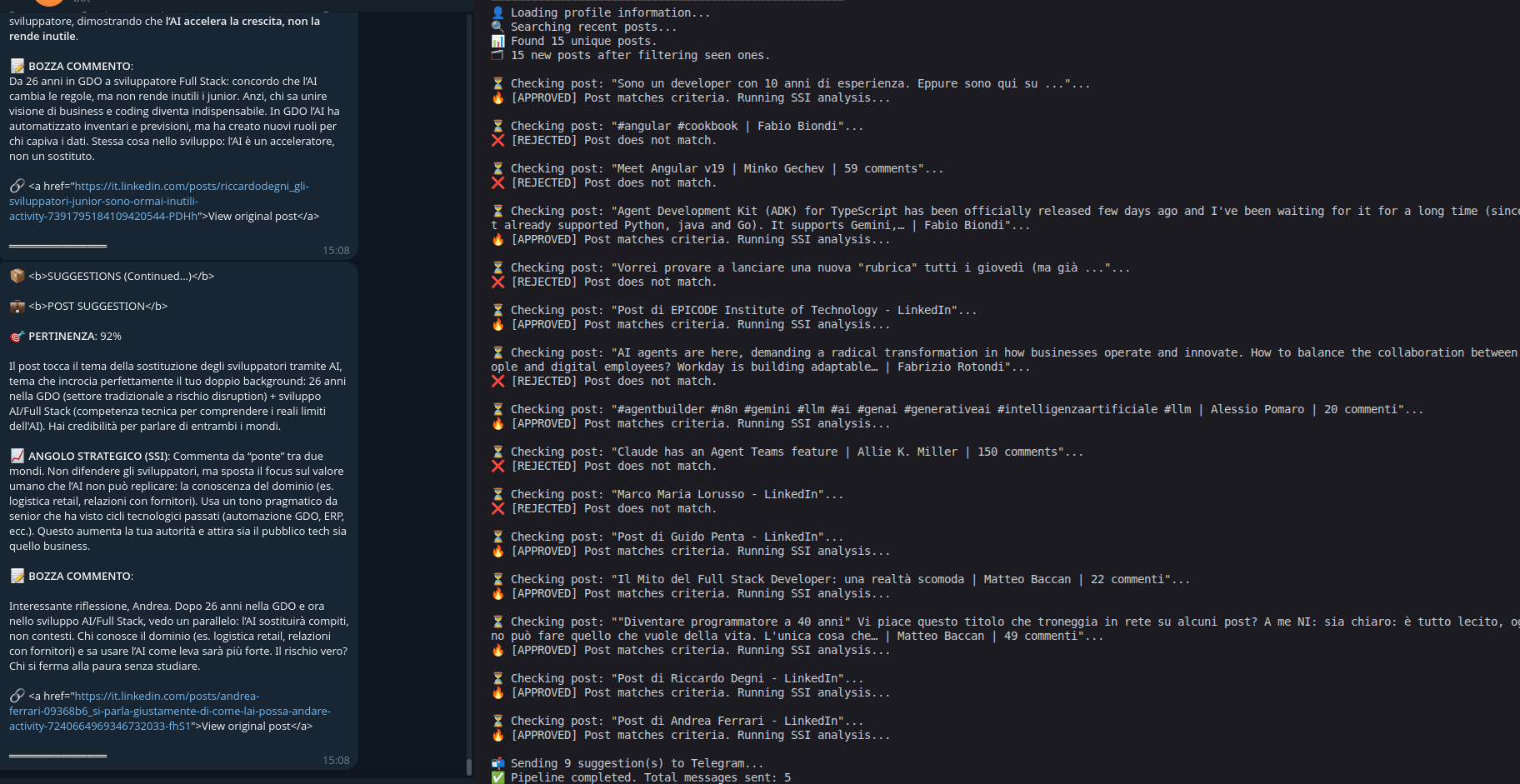
LinkedIn Assistant automatizza le parti ripetitive: ricerca post rilevanti, li valuta con due fasi di analisi AI, genera bozze di commento in italiano coerenti con il profilo professionale e consegna il digest su Telegram. La decisione finale resta all'utente: il sistema prepara, l'umano decide.
- Discovery duale: Playwright headless (con session cookie LinkedIn) come fonte primaria, Tavily come fallback
- Caricamento profilo dinamico da LinkedIn o da data/cv.md per contestualizzare le query
- Query di ricerca generate dinamicamente in base al profilo e all'attività recente
- Deduplica URL in-run e cross-run via file seen_urls.json persistente
- Triage Stage 1 con Groq / Llama-3.3-70b: risposta SI/NO in max 5 token, economico e veloce
- Analisi Stage 2 con DeepSeek-chat: punteggio PERTINENZA (0-100%), angolo strategico e bozza commento
- Soglia minima 70/100: solo i post più rilevanti raggiungono il digest
- Digest Telegram in HTML con batching a 4000 caratteri per messaggio
- Bot interattivo con comandi /suggest, /profile, /status per trigger on-demand
Flusso ad alto livello
Competenze dimostrate
- Progettazione di workflow AI human-in-the-loop per personal branding professionale
- Pipeline a due stadi: modello veloce per triage, modello profondo per analisi e generazione
- Web scraping headless con Playwright e fallback automatico su API di ricerca (Tavily)
- Scoring semantico contestuale: punteggio PERTINENZA calibrato sul profilo dell'utente
- Generazione assistita di commenti in italiano coerenti con tono e posizionamento personale
- Deduplicazione persistente cross-run per evitare rumore e ripetizioni
- Delivery operativa su Telegram con bot interattivo e comandi on-demand
Come questo approccio può aiutare un team
Lo stesso pattern search → triage → deep analysis → digest può essere adattato a consulenti, founder, recruiter, creator B2B e team commerciali che vogliono monitorare conversazioni rilevanti senza trasformare l'engagement in automazione cieca.
- Social listening professionale per consulenti e freelance su temi del proprio settore
- Lead intelligence: monitoraggio conversazioni B2B e segnali di interesse commerciale
- Scouting opportunità per recruiter: post di founder, hiring manager o aziende target
- Supporto a team commerciali: digest giornaliero di conversazioni rilevanti nel mercato
- Monitoraggio topic e keyword per personal branding su LinkedIn o altri social
- Digest settimanali di contenuti rilevanti per creator e professionisti del settore
Perché human-in-the-loop è fondamentale
Automatizzare l'engagement professionale richiede attenzione. Un sistema che pubblica automaticamente può diventare invasivo, generico o dannoso per la reputazione. LinkedIn Assistant è pensato come supporto decisionale: prepara bozze e porta opportunità all'attenzione dell'utente, ma la decisione finale sul tono, sul contesto e sulla pubblicazione resta sempre umana.
- Nessuna pubblicazione automatica non supervisionata: il commento viene consegnato come bozza
- Il digest Telegram mostra post, analisi e bozza: l'utente decide cosa fare
- Il sistema filtra e prepara, l'umano valuta e pubblica
- Qualità del commento più importante del volume: meglio meno, ma pertinente
- Attenzione a policy della piattaforma e reputazione professionale
Vuoi costruire un workflow AI per monitorare conversazioni rilevanti nel tuo settore? Posso aiutarti a progettare un sistema che filtra opportunità, genera bozze e le consegna dove lavori già.
Parliamo del tuo workflowDocumentazione tecnica completa
README, configurazione e istruzioni di setup su GitHub.