Workflow Multi-Agents
Protocollo di orchestrazione multi-modello per lo sviluppo software. Ogni modello ha un ruolo definito, un fallback nominato e boundaries chiari. L'orchestratore propone, l'umano approva.
workflow-multiagents
A model-agnostic orchestration protocol for distributing software development tasks across multiple AI models — each with a defined role, a named fallback, and clear boundaries.
Not a framework. Not a library. A rule file and a protocol that turns a collection of AI models into a coordinated team.
The Problem
Most developers use a single AI model for everything. That's like having a team of specialists and routing all the work through the generalist. You burn through rate limits fast, get suboptimal results on tasks outside the model's sweet spot, and the bottleneck is never the token limit — it's the lack of a system.
How It Works
The orchestrator (Gemini in this setup) follows a 3-step protocol before assigning any model to a task:
Step 1 — Decompose Does the task have distinct components that would benefit from different models? If yes, split into microtasks. Before anything else: strip out anything reserved for Copilot CLI (comments, docstrings, test suites, docs) — those are handled in bulk at the end.
Step 2 — Assign roles Apply the role table to each microtask (or the whole task if atomic). When ambiguous, prefer the cheapest model in terms of rate limit consumption.
Step 3 — Load check Is the chosen model approaching its rate limit this session? If yes, activate its named fallback. If the fallback is also limited, drop to Qwen (coding) or Gemini Flash (everything else), then flag it.
After the protocol, the orchestrator proposes its choice and waits for explicit approval before executing. Nothing runs without a human gate.
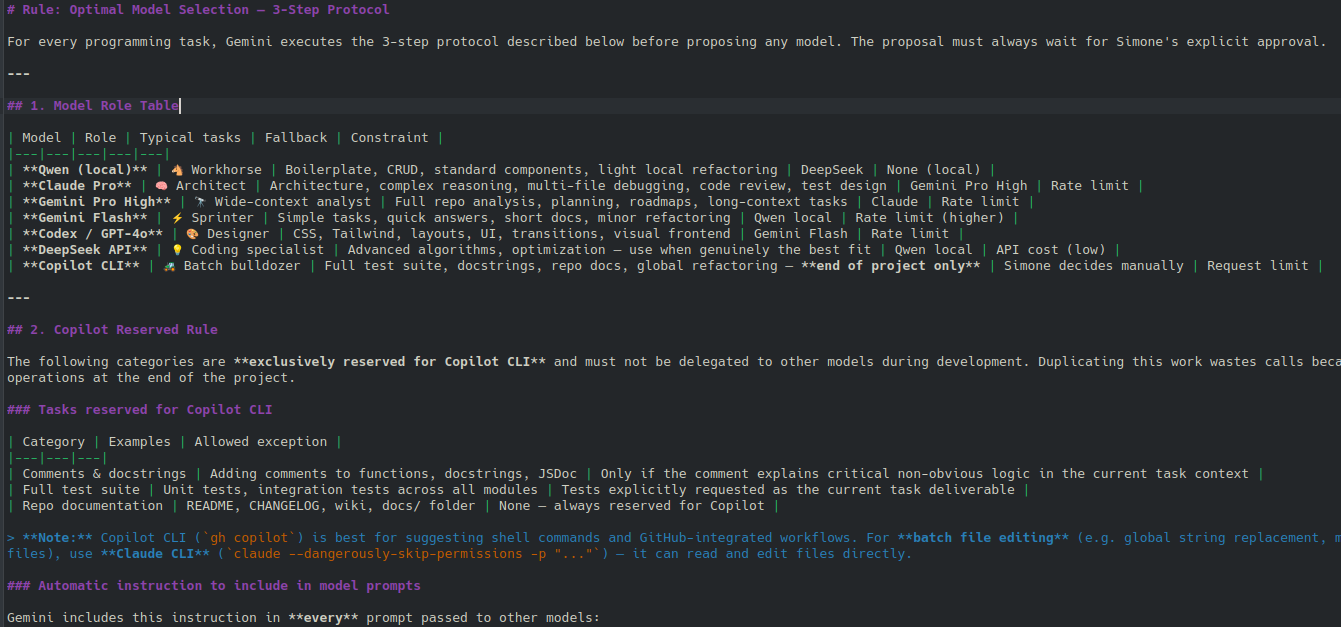
Model Role Table
| Model | Role | Typical tasks | Fallback | Constraint |
|---|---|---|---|---|
| Qwen (local, Ollama) | Workhorse | Boilerplate, CRUD, standard components, light refactoring | DeepSeek | None (local) |
| Claude Pro | Architect | Architecture, complex reasoning, multi-file debugging, code review | Gemini Pro High | Rate limit |
| Gemini Pro High | Wide-context analyst | Full repo analysis, planning, roadmaps, long-context tasks | Claude | Rate limit |
| Gemini Flash | Sprinter | Simple tasks, quick answers, short docs, minor refactoring | Qwen local | Rate limit (higher) |
| Codex / GPT-4o | Designer | CSS, Tailwind, layouts, UI, transitions, visual frontend | Gemini Flash | Rate limit |
| DeepSeek API | Coding specialist | Advanced algorithms, optimization | Qwen local | API cost (low) |
| Copilot CLI | Batch bulldozer | Full test suite, docstrings, repo docs, global refactoring — end of project only | Simone decides | Request limit |
The Copilot Reserved Rule
Certain task categories are exclusively reserved for Copilot CLI and must not be delegated to other models during development. Duplicating this work wastes calls — Copilot handles it in one or a few batch operations at the end.
Reserved categories:
- Comments and docstrings
- Full test suite generation
- Repository documentation (README, CHANGELOG, wiki)
- Global refactoring (renaming, style uniformity across all files)
The orchestrator includes this instruction in every prompt passed to other models:
Do not add comments, docstrings, or automatic tests when generating code for this task. These will be handled by Copilot CLI at the end of the project. Generate only the working code required by the task.
Exceptions: a comment explaining critical non-obvious logic is fine. A test explicitly requested as the task deliverable is fine.
The Models Are Just Variables
This system was built with a specific stack (Claude, Gemini, Qwen, Codex, DeepSeek, Copilot CLI), but the architecture is model-agnostic.
To adapt it to your setup:
- Open
rules/scelta_modello.md - Swap out the model names in the role table
- Update the CLI execution commands in Section 3
The protocol, the Copilot Reserved rule, and the human approval gate stay exactly the same.
How to Use It
Option 1 — As an agent rule file
Drop rules/scelta_modello.md into your project's .agent/rules/ directory. Compatible agents (Claude Code, Cursor, Windsurf) will load it automatically at the start of each session.
Option 2 — As a manual orchestration reference Keep the role table open while working. Before starting any non-trivial task, run through the 3-step protocol mentally and pick your model accordingly.
Option 3 — Fork and adapt Clone the repo, update the role table with your preferred models and their actual rate limits, and commit it to your project as a living document.
Repo Structure
rules/
  scelta_modello.md        # The rule file — loaded automatically by compatible agents
docs/
  superpowers/
    specs/                 # Design document: decisions and rationale behind the system
    plans/                 # Implementation plan used to build this
The full design process — brainstorming, trade-off analysis, and spec — is documented in docs/superpowers/specs/2026-05-21-model-selection-workflow-design.md.
Author
Simone Camerano — AI workflow engineer and full stack developer.